A till that knows
what is in the
stockroom.
Open a page in the browser and sell. No separate account, no catalogue to import, nothing to keep in step overnight. Sales are written as WooCommerce orders, so the counter and the website read the same figure because there is only one figure.
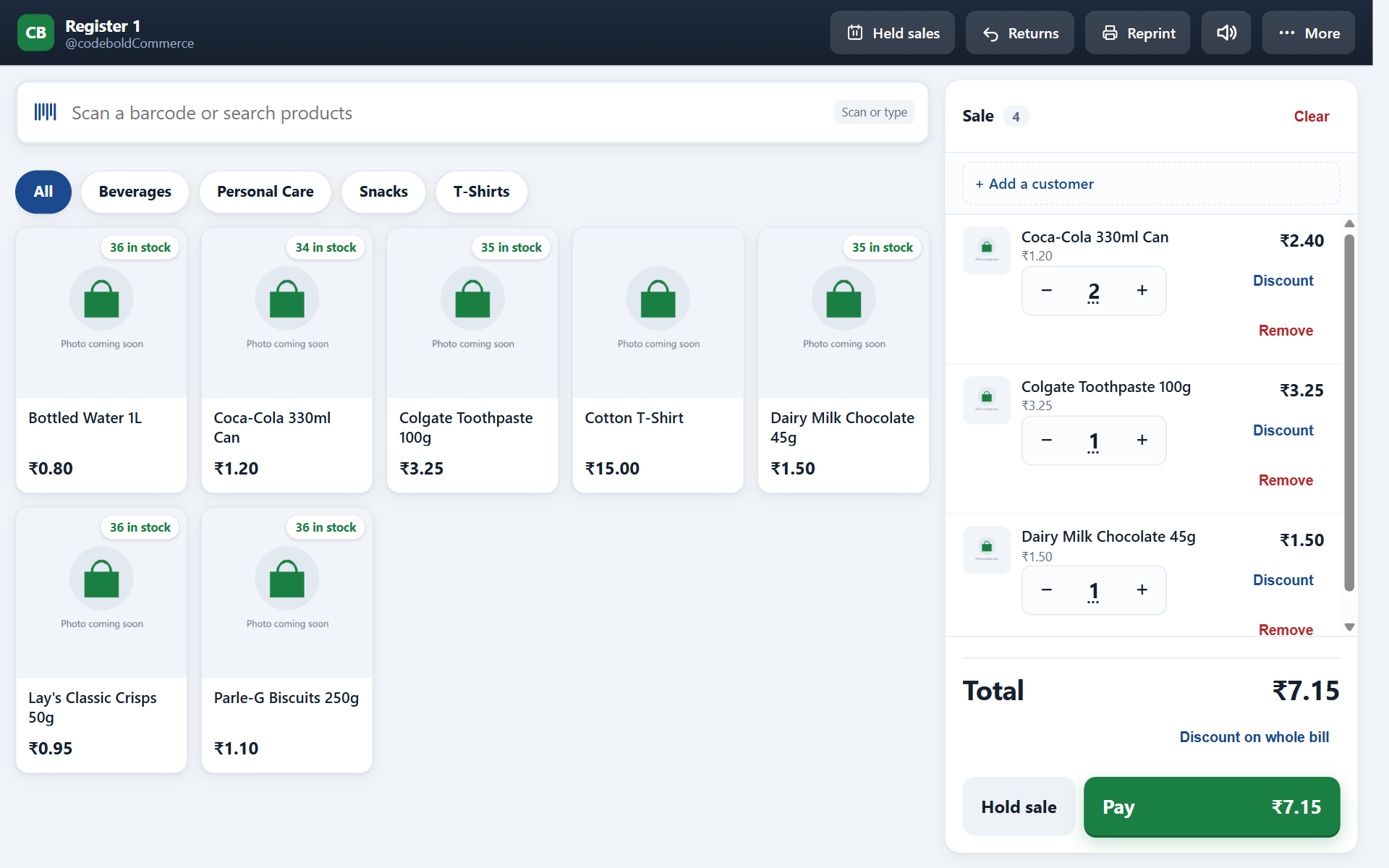
Ring it up.
The screen is built for someone standing up with a queue in front of them, not for someone sitting down with a mouse.
Scan or search
A USB or Bluetooth scanner puts the line on the sale. No barcode, or a garment that never had one? Search by name and pick from the tiles.
Variants as badges
Size and colour sit on the tile itself. The cashier is choosing between two badges, not reading a dropdown of forty variants.
Park a sale
Someone has gone back for a second size. Park it, serve the next customer, come back to it. Parked sales survive the end of a shift.
Discounts and price overrides
Separate permissions, so a cashier can be allowed one without the other. Both are recorded against the sale and the person who made it.
Refunds by receipt number
Type the number from the paper in the customer's hand. The lines come back, the stock goes back on the shelf, the ledger records why.
Receipts
Thermal printer or on screen, with your logo, header and footer. Tax is broken down by rate, taken from WooCommerce’s own settings rather than a second tax setup, and there is a preview before anything reaches the paper.
The till records.
Your terminal
charges.
Two tender types ship: cash and card. Cash calculates the change. For a card, the cashier charges it on the machine already on your counter and presses Card — the order is marked paid with the tender recorded against it.
A sale can be split across both. Two thousand in cash and the rest on a card is one sale with two tender lines, not two sales to reconcile at the end of the week.
Your website is untouched. Whatever gateway your shop runs online keeps running online, exactly as it does today.
What a shift records
Opening float, every cash movement in and out, safe drops, and the tender breakdown at close. An X report checks the drawer mid-shift without closing it; the Z report closes it.
Counted versus expected
The Z report puts what the till expected, what you counted and the difference on one line. A small variance is a wrong bit of change. A large one is a conversation, and now it is a conversation with a number attached.
Further tenders
Cash and card ship, and those are the two the till knows. A developer can add UPI, cheque or on-account through a filter, and they appear at the counter and on the Z report like the built-in two. Not gift cards — that is store credit, which the plugin does not keep.
What works
offline, exactly.
Holding a sale on a device is the easy half. The hard half is two tills coming back at once. Receipt numbers are reserved in advance, so two tills selling through the same outage cannot print the same number — and when the line returns, the sync says what went through and what did not.
Selling
The screen, the products and the prices are cached. The sale is taken, the receipt prints, the change is counted, the number is already reserved.
Writing the order
The WooCommerce order is written when the connection returns. Until then the sale sits on the device, visible and counted in the queue.
Anything shared
Live stock from another outlet, a transfer, a purchase order, reports across registers. These are shop-wide, so they wait for the shop-wide connection.
Numbers reserved up front · queued on the device · reported on return
Twelve till
permissions.
Each one is separate, so a cashier can refund without being able to discount, and a shift manager can see reports without being able to override a price. The check runs twice — once when the menu is registered, and again when the page renders — so typing the address into the bar does not get anybody in.
- Use the till
- Open a shift
- Close a shift and count cash
- Manage registers
- Apply discounts
- Override prices
- Void lines and sales
- Process refunds
- Returns without a receipt
- Open the cash drawer
- Cash in, cash out, safe drops
- View POS reports
About the till.
Does the till charge the card?
What hardware do I need?
Can two people use the same register?
What happens to a parked sale at the end of the day?
Free, and
what paying adds.
Everything below works forever, on one website, with no account and no card.
- The whole till — scanning, split payments, receipts, refunds
- Selling with the internet off, and syncing when it comes back
- Stock across as many outlets as you run
- Suppliers, purchase orders and receiving against them
- Stock takes on a phone, saved as you go
- Barcode labels and shelf-edge labels
- Cash-up, shift reports and sales reporting
- Twenty-six permissions, so staff see only their own job
Everything in free, and:
- Transfers between outlets, with stock in transit accounted for
- Stock valuation — what the shelf is actually worth, at cost
- The restaurant module: tables, tabs, modifiers, kitchen tickets
- Recipes that take real ingredients out of real stock
Try it on a test copy of your website
this afternoon.
The free plugin is a working till. The stockroom sits behind the same install.